




The best Class Scheduling Software for training providers is designed to meet more than basic calendar needs. It also handles B2B logistics. This Class Scheduling Software does more than book appointments. It can create multisection sessions, invoice student groups, manage classrooms, and sync roster data with an LMS. If you choose a widget, you may waste time. The right Class Scheduling Software ensures every minute of your time is spent wisely.
Why do scheduling fitness apps fail at B2B training logistics?
The generic scheduling app systems designed to organize single-appointment bookings fail to accommodate the nuances of resource management for B2B training services. When a business buys a gym booking system to offer corporate training services, the profit margins get eroded by the drudgery of data entry.
A 2025 ATD technology report revealed that organizations with disjointed scheduling systems spend 15 hours per week reconciling attendance figures. The limitations of fitness booking systems manifest when a corporate client wants to reserve a spot for twenty employees for a training course, where the system requires twenty separate payments.
In addition, the 2026 People Managing People software review stated that generic appointment scheduling systems lacked the capability of organizing training logistics, such as instructors’ itineraries, classroom resources, and prerequisite courses. Any scheduling software that fails to integrate the instructor’s calendar with the training venue resources will result in double-bookings and lost revenues.
What are the key features that you should look for in Class Scheduling Software?
To grow training operations in a scalable way you must evaluate Class Scheduling Software from an enterprise delivery perspective. A simple approach that relies on timeslot widgets and basic resource planning will not meet the needs of commercial instructorled training (ILT).
Graphical resource allocation and conflict detection
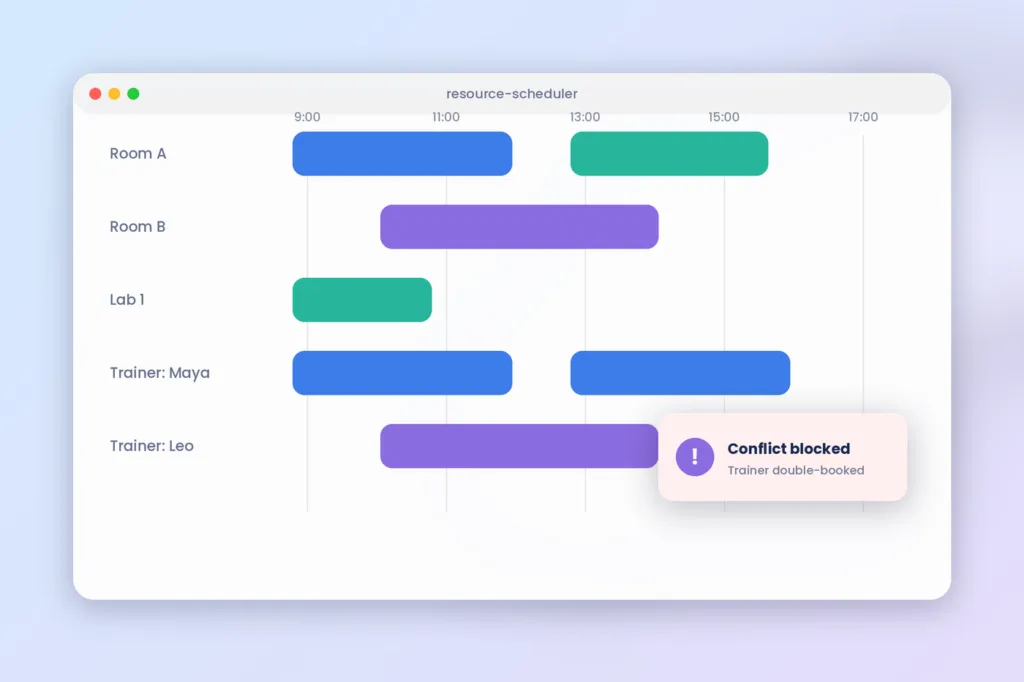
To schedule instructor led classes, you must orchestrate many interlocking dependencies at once. Graphical resource planning software locks the physical room, the required audiovisual equipment, and the instructor’s calendar at the exact moment a session is created. Automated scheduling engines are the primary driver of cost reduction for commercial training providers, reports 2026 B2B workflow analysis by Training Industry. When venue reaches maximum capacity or trainer is already booked, the system’s conflict detection will prevent scheduling attempt.
Multi-seat corporate group invoicing
Corporate buyers rarely buy single seats for professional development courses. That means your class booking systems must let corporate administrators buy block seats and add learner names at a later time. They also need to generate a consolidated invoice tied to a purchase order. If your system doesn’t support multi-seat B2B invoicing your coordination team ends up handling individual registrations one by one. That leads to work and hidden costs when trying to figure out how to price training courses.
Native LMS and TMS data syncing
Without native connections administrators are required to export CSV files by hand and update the data, in the learning records system. Modern course management software usually has built-in apps and systems that sync current student data from the checkout page to the LMS. Pre-course emails are sent automatically when a student is successfully enrolled and compliance prerequisites are added.
Automated waitlist management and revenue recovery
Automated waitlist management systems recover revenue from delegates who pull out of booked courses at the eleventh hour. In conjunction with the LMS integration, when a delegate withdraws, waitlisted corporate clients from the original course will be automatically notified in accordance with their booking priority. This removes the need for operations to trawl through alternate contacts, saving both time and revenue.
Hybrid delivery and multi-timezone coordination
Blended and hybrid course scheduling involves coordinating room technology and multi-timezone availability. Commercial training systems automatically adjust the start time of each session in the respective portal to avoid trainer fatigue, and to factor in travel time between sessions. By linking a virtual meeting link to the room’s audio visuals, the hassle of connecting multiple devices is eliminated.
Top Class Scheduling Software for commercial training
We analyzed modern training management systems by their capacity to address commercial training industry needs in automated invoice processing and resource planning for large-scale instructor-led training programs.
SimpliTrain: best for all-in-one training management software
SimpliTrain is an end to end training management system for organizations that require complete end to end automation of training operations. Notable features of our solution include integrated scheduling and learning management system functionalities. SimpliTrain is ideal for organizations that want to replace multiple single-purpose systems with a unified platform. For more information about our product, visit the SimpliTrain Product Page.
Arlo: best for automated course websites
Arlo is a training management system designed to automate the registration process for public classes and website sales funnels. The software’s main advantage is its ability to create re-usable course templates that are immediately available for booking on an integrated website. Arlo is best suited for organizations that rely on publicly available course listings and automated ticket sales.
Training Orchestra: best for enterprise resource planning
Training Orchestra is an enterpriselevel training management system that is designed to give resource planning tools to companies that run big instructorled training programs. Training Orchestra supplies graphical scheduling tools that let users see how training resources are used, such as calls to action, for trainers, classroom availability and travel budgets. Training Orchestra is best used when your organization has hundreds of instructors and many corporate training centers.
Accessplanit: best for bulk back-office automation
Accessplanit is a comprehensive training management system built to address the needs of high-growth organizations that require bulk automation of back-office operations. The software is ideal for automating repetitive communication tasks and utilizes unique financial reporting tools for corporate training providers. We recommend using this solution if your organization needs to minimize the time spent on back-office processes, including class coordination.
Comparing top class scheduling tools for training businesses
Identify the features in a scheduling tool that will most benefit your training organization by considering the limitations of your predominant delivery method.
For guidance on initiating the purchasing process, refer to our Training Management Software Buyer’s Guide 2026 to help identify the best fit for your company’s needs.
| Class Scheduling Software | Best Used For | Key B2B Feature | Pricing Model |
|---|---|---|---|
| SimpliTrain | Unified TMS and LMS operations | End to end roster syncing | Transparent per-user tiers |
| Arlo | Public commercial course sales | Automated website publishing | Per administrator / month |
| Training Orchestra | Global ILT resource management | Advanced conflict detection | Custom enterprise quoting |
| Accessplanit | Back-office workflow automation | Complex corporate invoicing | Custom tiered pricing |
FAQs
1. What is “Class Scheduling Software” for training providers?
Class Scheduling Software for training providers is used to manage lessons’ timing, teacher appointments, venue capacities, and participant registrations. Unlike fitness booking apps, it allows for scheduling multiple training sessions, creating waiting lists, and providing corporate events with online calendar synchronization.
2. Why do fitness studio scheduling apps miss corporate training providers’ demands?
Fitness scheduling apps for single-visit gym memberships do not work well for trainers. These apps lack the tools needed to connect with enterprise learning systems. They also struggle to handle events that take place across locations, span several days, or involve many participants. Instructors need advanced options and these basic apps fall short.
3. How do you avoid double booking training rooms and instructors?
To avoid double-booking resources, choose Class Scheduling Software that blocks overlapping session reservations at the time. The Class Scheduling Software locks meeting rooms, AV equipment and instructor calendars when you set up a session. The class’ scheduling software immediately stops instructors from double-booking sessions. It also stops meeting rooms from exceeding their fire-code capacity limits.
4. How much does Class Scheduling Software cost?
Most commercial scheduling software costs between $150 and $800 a month. The price differences are based on the appointments, active seats and features you need. Booking widgets usually have lower entrylevel prices than full appointment booking software. Most of them do not give corporate billing branded registration pages or LMS integration right out of the box.
5. How does scheduling software integrate with a learning management system?
The programs for scheduling classes connect to the LMS through APIs or via independent software agents. After the student signs up for a class and pays for it, the software automatically provisions the participants’ training records in the LMS, adds pre-work modules, and provides access to the training resources.
6. Which Class Scheduling Software is best for training companies?
The choice of the best software depends on the specific needs of the organization. Arlo is best suited for automating the sale of public commercial course websites. Training Orchestra is most appropriate for multinational corporations that need advanced instruction learning tools. SimpliTrain is perfect for organizations that require a single integrated solution for scheduling classes, planning resources, and offering instruction.
Replace your scheduling spreadsheets with automated workflows
Replacing your generic calendar widgets with a dedicated scheduling platform will enable your team to host more classes while eliminating the back-office admin hours and providing a seamless purchasing experience for your b2b clients.
If your training organization is considering a shift from managing spreadsheets and calendars, check out our guide to the best training management software for small business to identify the right tools for your needs. Set up a time to demo SimpliTrain and automate your training logistics.