




These are the tools that will help in proving the effectiveness of a training program. The best tools for a training company include just four; these are a feedback form, a test, a follow-up, and operations reports.
The following guide shows how to select appropriate tools based on the questions being asked by clients and accreditation agencies and how to create a package that is manageable.
What are training evaluation tools, and which ones do providers need?
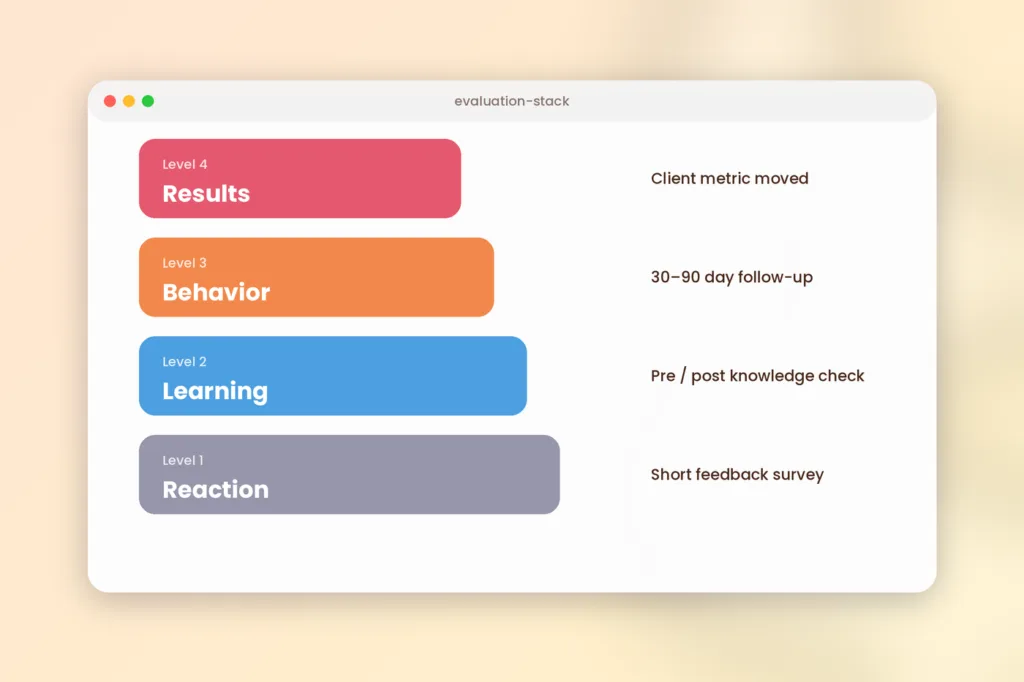
Training evaluation tools are any instruments that collect evidence on whether training worked. Providers usually need six types. The four areas above include what the learners feel, what they learn, what they do after being trained, and how effective you are in your delivery.
Below is the alignment of the six tools with the Kirkpatrick Model levels.
| Tool | Question it answers | Kirkpatrick level | When to run |
|---|---|---|---|
| Feedback survey | Was it relevant and well delivered? | 1 (Reaction) | End of each session |
| Knowledge check | Did learners learn it? | 2 (Learning) | Before and right after |
| Observation checklist | Can they do it? | 2 to 3 | During the course, and later on the job |
| Follow-up survey or manager check-in | Are they using it? | 3 (Behavior) | 30 to 90 days later |
| Client results data | Did a business metric move? | 4 (Results) | Months later |
| Operations reports | Is delivery healthy? | Supports all levels | Continuously |
Think of the levels as two halves. Kirkpatrick Partners describe Levels 1 and 2 as data on the training itself, and Levels 3 and 4 as data on how effective it was (ATD: Updating the Four Levels for the New World). So a survey and a test tell you about your course. A follow-up and client data tell you about its impact. Most suppliers do only the first half.
It should be noted that this same source recommends reverse engineering. It suggests starting your project by telling what your leading indicators will be and then linking them to the Level 4 outcome. It all depends on asking one question from the client before designing anything: “What would you expect to see change?”
Insight: Most evaluation for training firms is a Level 1 measurement plus an assumption. One extra question at 30 days puts you in the half clients care about.
Where do feedback surveys miss the mark?
Feedback surveys fall short because satisfaction and learning are barely related. Researcher Will Thalheimer reports that two meta-analyses covering more than 150 studies found a correlation of about 0.09 between smile sheet scores and learning results, and anything under 0.30 counts as weak (Thalheimer in ATD Insights).
That does not mean you should drop surveys. Instead, change the questions. An approachable trainer may receive five stars without anyone learning anything. Questions about use and confidence give you better evidence. Here are four swaps we suggest:
- Change “Was the trainer good?” to “Which skill learned today will you apply first, and what may stop you?”
- Change “Rate the course 1 to 5” to “How confident are you in doing this task on your own tomorrow?” and give 4 answers.
- Replace “Was the content relevant?” with “Which part of today’s material fits your daily work least?”
- Replace “Any comments?” with “Which single alteration would make this course more valuable?”
Because these questions ask about action, they give trainers something to fix. They also give accreditors something to read.
Make the questionnaire brief. Better five precise questions than fifteen that confuse and cannot be answered by learners.
What amount of evaluation is necessary for each class?
Match evaluation depth to the course type, because deeper measurement costs more time. The ROI Institute, which teaches the Phillips method, adds a fifth level for return on investment, and stresses isolating the program’s effect while accepting that not every program needs all five levels (ROI Institute comparison of Kirkpatrick and Phillips).
So use a sliding scale. Here is a starting point.
| Course type | Minimum evaluation | Add this when | Main audience |
|---|---|---|---|
| Open-enrolment short course | Survey plus short knowledge check | Repeat clients ask for results | Learners and your quality team |
| Accredited or compliance course | Survey, assessment and trainer observation, stored with the learner record | An accreditor audits you | Accreditors and regulators |
| Corporate custom program | Survey, pre and post test, 30 to 90 day follow-up | The client wants proof of use | Client sponsor |
| Flagship or high-cost program | All of the above plus one business metric | Renewal or a big budget is at stake | Executives |
For the last row, ROI is worth the effort only for one or two programs. Phillips-style ROI divides net benefits by costs. First, however, you have to isolate the impact of the training from all other changes. This requires some time, and so you should not guarantee this for every training program.
Choose the evaluation level before selling the training program, and not after completion of the program. A client who agrees to be contacted by his manager in the beginning will most probably respond.
What is a basic structure for an evaluation stack?
A simple stack has five parts and takes little time per session. These steps should be followed in the sequence provided below:
- Proof Question: Before starting the program, find out who defines success and on what evidence base.
- Check knowledge at the important start: If you teach corporations or accredited programs, give the knowledge test before starting.
- Survey after every training: Ask no more than five questions using the switches mentioned above.
- Test knowledge before they depart: Give them a quiz, assignment, or an observation checklist.
- Feedback after 30 to 90 days. Send learners three questions. For corporate clients, send their manager a three-question check-in too.
Review the outcomes of your evaluation each quarter. Compare the trends in each course and in each trainer. At the same time, document all changes you implement according to feedback. The log will convert disparate forms into a coherent narrative to be shared with the client.
Thirty to ninety days is just a suggestion and not a standard. You may pick any number that will give students ample time to implement the learning.
A tool no one reads is a waste. Any result not making a decision. for example, training session or course revision, must be removed.
How can evaluation documents aid with accreditation?
Evaluation records double as accreditation evidence, so store them with your learner files. Accreditors do not just want good courses. They want proof that you check whether the courses work.
For example, IACET’s standard requires providers to have a process to measure the effectiveness of their development, administration, delivery and support of training (ANSI/IACET 1-2018 requirements matrix). Likewise, the Chartered Insurance Institute’s CPD standards list a process to identify whether the learning outcomes were met, plus records of evaluation and review and participant feedback records (CII CPD accreditation standards).
So keep four things for every course:
- Survey responses, with dates and cohort details.
- Learner assessment or observation results for each learner.
- Follow-up results if any, as you gather them.
- A brief review log indicating what was changed and why.
Different accreditors have different requirements for evidence, so be sure to check the requirements before designing your forms.
“We said, you did” is the most convincing page in an audit file.
How do you select evaluation software?
Choose your software according to what answers it gives rather than what functions it offers. You can use free online survey software or spreadsheet software for a few classes. Software becomes worthwhile where there are numerous sessions, and you need outcomes linked to the trainer, class cohort, and certificate.
Here are six criteria that you should consider while comparing:
- Surveys linked to course/session/program
- Timing control, e.g., end of session/program.
- Assessments and question banks in the same system.
- Results by course, trainer and period.
- Learner records you can export for audits.
- A way to run follow-ups after the course ends.
This is a product owned by us; hence, take note of this particular point. The questionnaire that we use in the context of training providers ties up the survey with any course, class, and session; activates it after a session is complete, between the sessions, and at the end of a learning program. You can also build tests with our assessments and exams, and track trainer performance through instructor management. All of it sits inside our training management features.
One caution: our survey page describes triggers around sessions and learning plans If you’re interested in a 30 or 90-day follow-up, be sure to find out how in the demo. For background on the wider system, read what training management is.
The software doesn’t know what “good” is. Start with your evaluation questions and then see if the software can answer them.
Your next step
Select three of your most valuable subjects now. For each, list the criteria for its success along with a single additional resource you can use for each to convince those people of your success. Afterward, use these resources in the coming class session. If you wish to view all three resources together, try SimpliTrain’s training management tools or request a demo including the three subjects.
FAQs
1. What is a training evaluation tool?
Training evaluation tools are instruments used to gather data about whether training was successful. These may be feedback forms, knowledge tests, observation checklists, follow-ups and reports. Software may be used to collect and analyze data, however, the tool is an individual question or measure, not a platform to deliver it.
2. What steps should be involved in evaluating the training course?
Define what kind of evidence will be required by the client or the accreditation body. Pick up one tool for one piece of evidence: use surveys for reaction, tests for learning, and follow-ups for application. Use each tool at its own time and keep the outcomes in the learner’s record. Repeat each cycle and compare trends for each course and trainer.
3. When should you send a follow-up survey after training?
A period of 30 to 90 days works for most courses; however, it is our recommendation, not a standard. Learners need time to apply the skill learned at work. Send a brief survey to the learner and, for corporate clients, a three questions check-in to their managers.
4. Is it necessary to conduct ROI for each of your courses?
Not always. The ROI Institute says that ROI doesn’t have to be performed at all five levels for each program. The calculation is time-consuming, as you have to extract training performance from various other factors. Therefore, you should calculate ROI only for one or two expensive or significant programs; as for others, use surveys and tests.
5. What Kirkpatrick’s levels should a training company evaluate?
Levels 1 and 2: a short survey and a pretest/quiz; for corporation courses and customized training – level 3, via follow-up in 30-90 days after the training course; and take level 4 measurement only for selected top clients by means of measuring certain customer metrics (error rates, sales performance etc.).
6. What is the best training evaluation software?
There is no single best choice; it depends on the goals you need to reach. Free surveys and Excel spreadsheets are enough if you conduct a couple of courses. If you conduct many trainings, then it makes sense to invest in a training management solution, as it gives a lot more value. We offer one, so try our demo.