
SimpliTrain vs. Arlo
The best Arlo alternative for instructor-led training
Arlo does registration and scheduling well. But when your training grows to include virtual sessions, blended programs, and enterprise clients who need their own portals, you start hitting walls. SimpliTrain is a comprehensive Training Management System (TMS) and Learning Management System (LMS) built for what comes next.
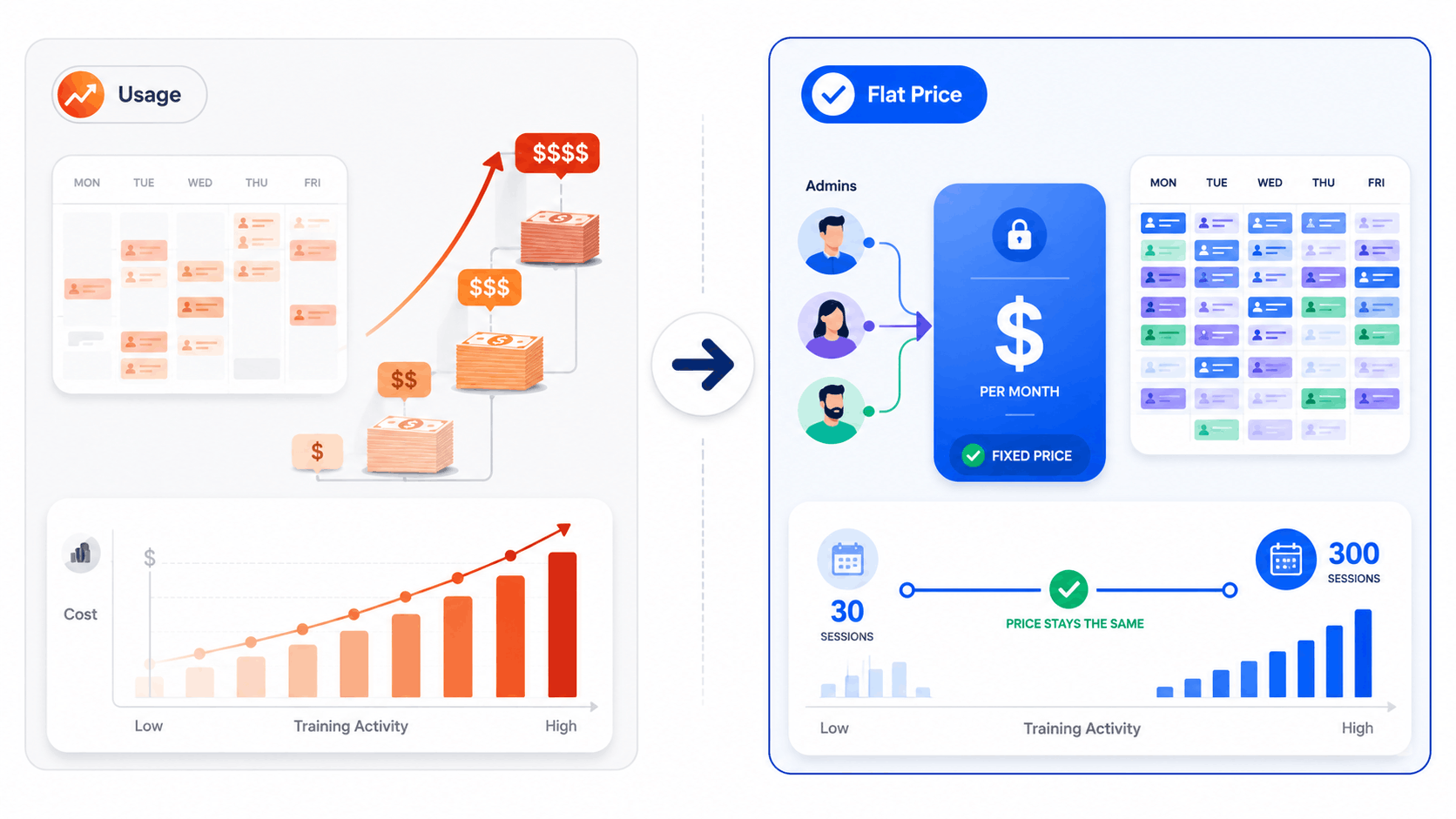
Your training bill should not go up every time a course fills up.
Arlo charges per registration on top of its monthly fee. SimpliTrain charges a flat rate per admin. The more training you run, the bigger the difference gets.
Arlo
Professional plan
$179/mo
Plus additional fees as registrations grow
Fixed cost
Vs variable billing
SimpliTrain
Any plan
Flat-rate
Same price whether you run 10 sessions or 200
Arlo
Phone and chat support
$240/mo
Enterprise plan only to unlock full support
Every plan
Gets full support
SimpliTrain
All plans
Included
Phone and chat support on every pricing tier
SimpliTrain vs. Arlo
A category-by-category breakdown. Click any section to expand.
| Features | Arlo | SimpliTrain |
|---|---|---|
Instructor-Led Training Scheduling & TMS Software Sessions · Trainers · Rooms · Batches · Locations 7 features | ||
| Session scheduling and calendar | Yes Core strength | Yes |
| Trainer and instructor management | Yes | Yes |
| Room and resource allocation | Limited Basic venue coordination | Yes |
| Multi-location operations | Yes | Yes |
| Batch and cohort management | Basic Event based, not cohort native | Yes |
| Automated attendance tracking | Yes | Yes |
| Trainer utilization and capacity reporting | Limited | Yes |
Virtual and Blended Training Delivery VILT (Virtual Instructor Led Training) · LMS Integration · Blended Learning 6 features | ||
| Built-in virtual classroom | No Relies on Zoom or GoToWebinar Integration | Yes – native |
| Native Zoom and Teams Integration | Yes This is how Arlo delivers virtual sessions | Yes |
| Blended learning in one system | Via Moodle integration | Yes – in one platform |
| Self-paced eLearning delivery | Newer feature – still developing | Yes |
| Learner self-service portal | Yes | Yes |
| Session recordings accessible to learners | No Handled externally via Zoom | Yes |
Registration, Sales and Ecommerce Sell Online Courses · Payments · Inventory · Discounts · CRM 7 features | ||
| Online course registration and bookings | Yes Core strength | Yes |
| Public course catalog and website integration | Yes Core strength | Yes |
| Payment processing and invoicing | Yes | Yes |
| Waitlists, discounts and vouchers | Yes | Yes |
| B2B corporate sales and client management | Yes | Yes |
| Separate branded portals per client | No Single shared storefront | Yes – multi-tenant |
| Checkout page customisation | Limited Frequently flagged in user reviews | Yes |
CRM and Learner Communications Contact records · Automated emails · Newsletters · Reporting 5 features | ||
| Built-in CRM for learner and client records | Yes Core strength | Yes |
| Automated email reminders and communications | Yes Highly rated by Arlo users | Yes |
| Salesforce integration | Available but limited Flexibility issues noted by users | Yes |
| Real-time reporting and dashboards | Basic Users report limited depth | Yes |
| Cross-location reporting in one view | Limited | Yes |
Certifications and Compliance Certificates · Expiry tracking · Renewals · Audit reports 4 features | ||
| Automated certificate generation | Yes Highly rated feature | Yes |
| Certificate expiry tracking and renewals | Basic | Yes |
| Compliance and audit reporting | Limited depth | Yes |
| Knowledge checks tied to session completion | Via Moodle integration | Yes – native |
Pricing, Support and Administration Cost model · Trial · Support access · Implementation 7 features | ||
| Pricing model | Usage-based per admin + registrations | Flat rate per admin |
| Learner fees | Costs rise as registrations grow | None – unlimited learners |
| Starting price | $185/mo simple, rises with usage | Flat rate, published |
| Free trial | Yes – 14 days | Yes |
| Phone and chat support | Enterprise plan only ($2000+/mo) | All plans |
| Mobile app for learners | Limited vs desktop Noted in multiple user reviews | Yes |
| Multi-tenant client portals | No | Yes |
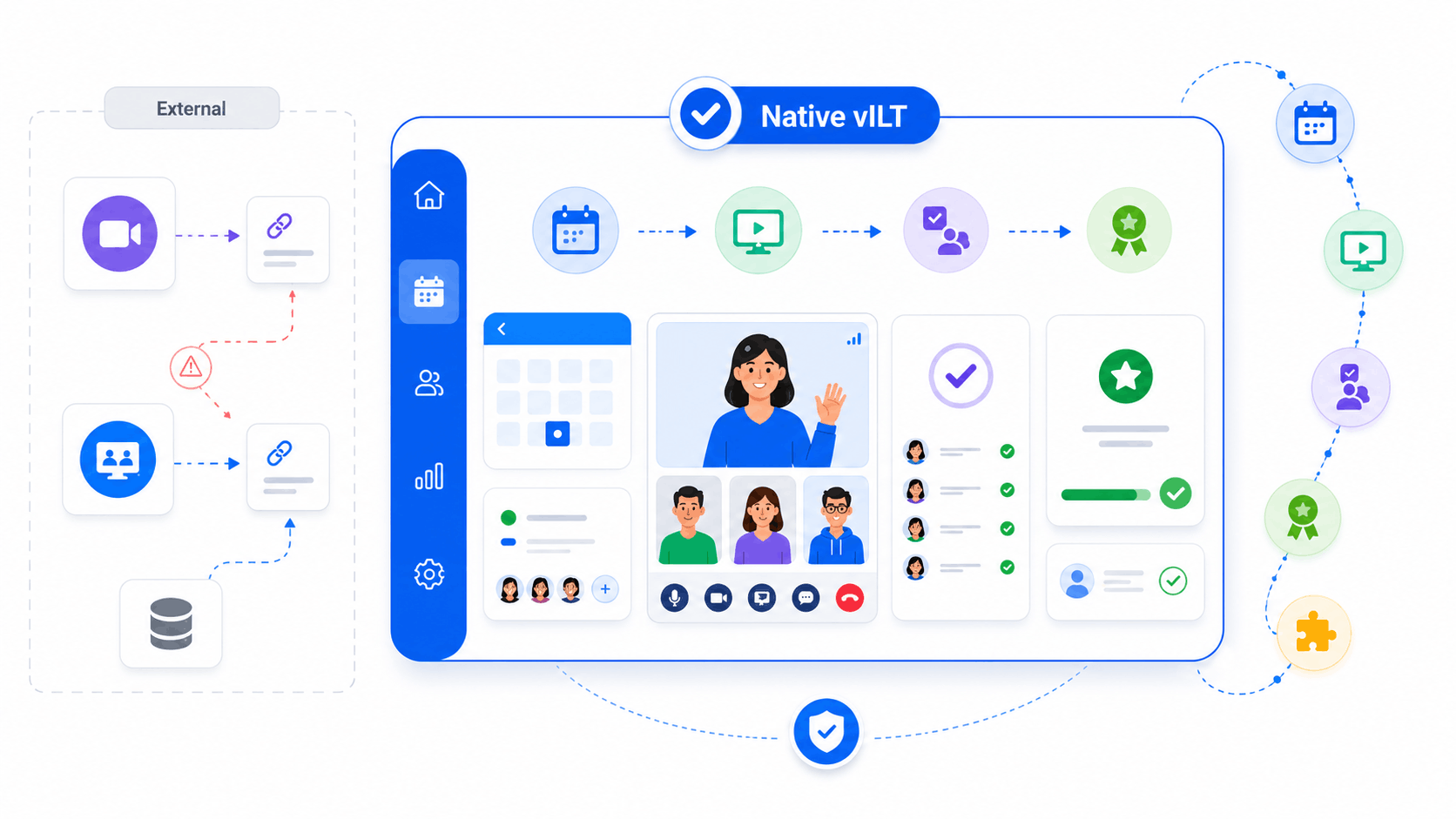
Virtual Instructor Led Training (vILT)
Deliver virtual instructor led training natively, without leaving the platform
When you use Arlo for virtual training, the actual session happens in Zoom or GoTo Webinar. That means two tools to configure, two sets of links to manage, and attendance data that lives outside Arlo until someone syncs it back. SimpliTrain has the virtual classroom built directly in.
Your instructors run classroom and virtual sessions from the same calendar, attendance is captured automatically, and every completion goes straight to the learner record without any manual steps in between.
- SimpliTrain advantage
Predictable pricing
A bill that stays the same, no matter how busy your calendar gets
Arlo’s pricing is usage-based. You pay per admin license and your costs increase as your registration volumes grow. That makes budgeting tricky for teams running frequent training cycles because a good month for training is also a more expensive month for your software for training management. SimpliTrain works the other way around.
You pay a flat rate based on your admin users and that number does not move. Whether you run 30 sessions this quarter or 300, your subscription stays exactly the same, making SimpliTrain the most cost-effective training management software for growing teams.
- SimpliTrain advantage
Enterprise client management
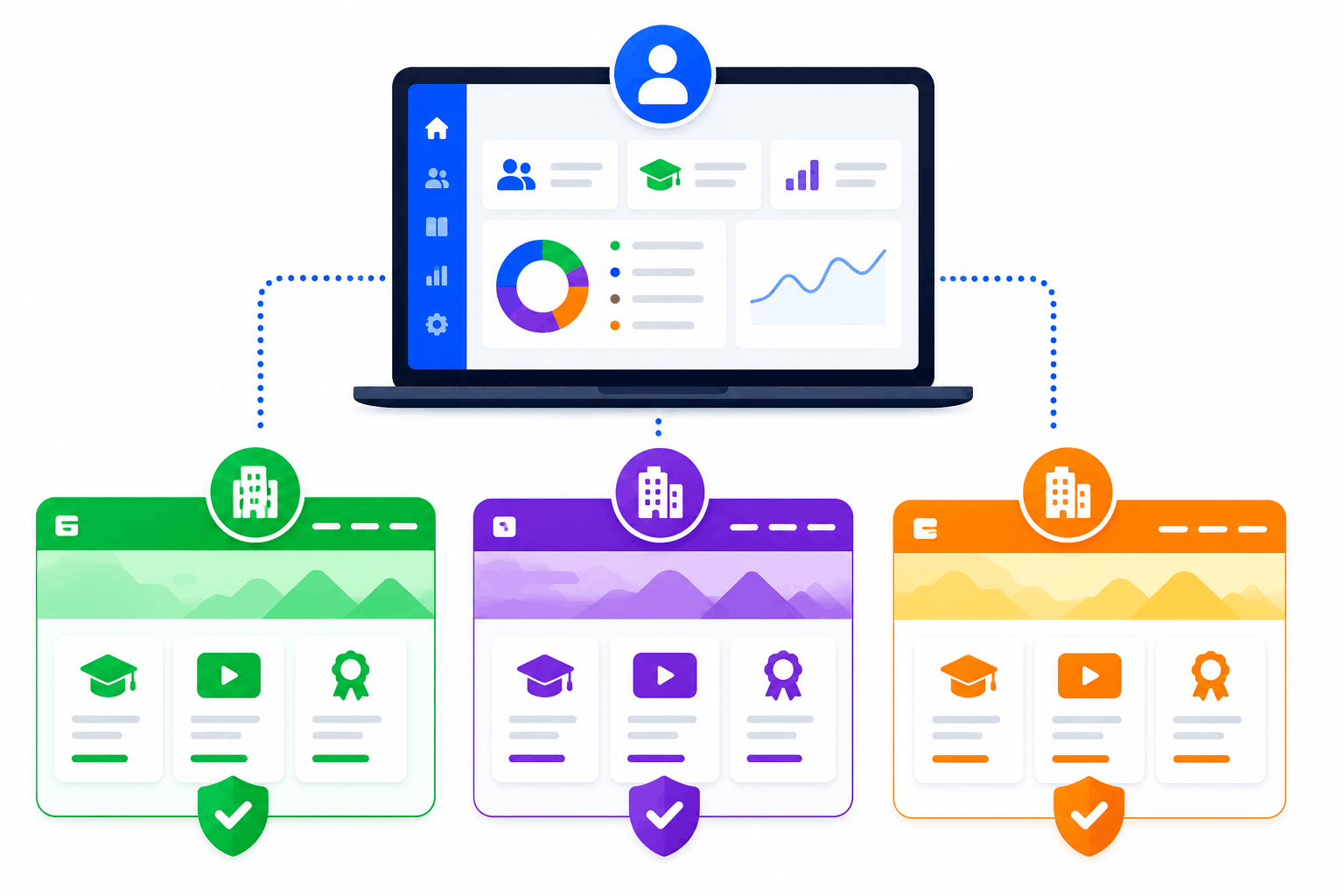
Separate portals for every client, all managed from one admin
As soon as you start working with enterprise clients who want their own branded space, their own learner data, and their own reporting, Arlo’s single shared storefront model becomes a limitation. SimpliTrain supports full multi-tenant architecture.
Each client gets their own portal with their own branding, their own course catalog, and their own learner records. You manage everything from a central admin. No bleed-over between clients and no need to jump to a higher-tier platform to make it work.
- SimpliTrain advantage
Discover with AI


10 things SimpliTrain does as a Training Management Software
Everything you rely on Arlo for, plus the enterprise capabilities you need in a modern training management system.
Instructor-led scheduling, fully featured
Schedule classroom and virtual sessions, allocate trainers, manage rooms, and run cohorts across multiple locations from one calendar. No spreadsheets required.
Virtual classroom that lives inside the platform
Run virtual instructor-led sessions natively. No separate Zoom account to configure, no attendance to manually import afterward. Everything stays in one place.
Pricing that does not punish growth
Flat rate per admin, unlimited learners. Your monthly cost stays the same whether you run a quiet month or your busiest quarter ever.
Separate portals for every enterprise client
Give each corporate client their own branded portal, their own learner records, and their own reporting. Managed centrally, invisible to each other.
Certifications tied to session completions
Certificates are generated automatically when a learner completes an instructor-led session. Expiry dates, renewal reminders, and compliance reports all included.
Classroom and online content in one learner journey
Combine instructor-led sessions with online pre-work or follow-up modules in a single learning path. No Moodle connection required to make blended programs work.
Phone and chat support on every plan
You should not have to pay $240 per month to get proper support. SimpliTrain includes phone and chat on every pricing tier, from day one.
Reporting that covers the whole operation
Trainer utilization, session capacity, enrollment trends, and completion rates across every location in one view. No exporting to Excel to see the full picture.
Commercial training and internal L&D, both
Run fee-based external programs and internal staff training from the same platform. Course catalog, ecommerce, and B2B invoicing sit alongside your scheduling.
Connects to the tools you already use
SSO, HRIS, CRM, Zoom, Teams, payment gateways, and existing content libraries. SimpliTrain fits around your current setup rather than replacing everything at once.
Who should use SimpliTrain and who should stick with Arlo?
Both platforms offer software for training management, but they serve different needs. If you are looking for a scalable TMS for training providers, the right choice comes down to where you are now and where your training is heading.
SimpliTrain
Worth a serious look if any of these feel familiar
- You run virtual instructor-led sessions regularly and want attendance, recordings, and completions tracked in the same place as your scheduling.
- Your training volumes vary month to month and usage-based pricing makes it hard to forecast your software costs.
- Enterprise clients are asking for their own branded portals and Arlo's single storefront model is not enough.
- You want instructor-led and self-paced content to sit in the same learner journey without connecting to Moodle or a separate LMS.
- You manage training across multiple cities or business units and need centralised reporting with location-level control.
- You want proper phone and chat support without having to upgrade to the most expensive plan to get it.
Arlo
Arlo may still be the right fit if
- Your operation is primarily about registrations and scheduling for classroom-only programs and you do not need virtual delivery or blended learning natively.
- You already have Moodle running and want a front-end registration and scheduling tool to sit in front of it rather than replacing it.
- Your training volumes are consistent and predictable, so usage-based pricing does not result in surprise bills at the end of a busy month.
- You are a smaller provider whose main priority is getting courses live on a website quickly with solid automated communications.
See what your training operation looks like in SimpliTrain.
Book a demo and we will show you the specific features that fill the gaps you have been working around in Arlo.
Frequently Asked Questions
Everything training teams ask when evaluating SimpliTrain against Arlo.
What does Arlo not do that SimpliTrain handles natively?
The three areas that come up most often are virtual classrooms, multi-tenant client portals, and blended learning without a Moodle integration. Arlo relies on Zoom or GoTo Webinar for virtual sessions, meaning your delivery tool and your scheduling tool are always separate. Arlo also uses a single shared storefront, so there is no way to give individual enterprise clients their own branded space. And while Arlo has been building out eLearning features, self-paced delivery is newer and still developing according to user reviews. SimpliTrain handles all three of these as core features, not add-ons.
How is SimpliTrain's pricing different from Arlo's?
Arlo charges per admin user on a monthly basis, and your costs increase as your registration volumes grow on top of that. Their plans start at $105 per month for the Simple plan, $179 for Professional, and $240 for Enterprise. SimpliTrain charges a flat rate per admin with no variable component tied to how many sessions you run or how many learners register. For teams with consistent or growing training volumes, that difference becomes significant over a full year. SimpliTrain also includes phone and chat support across all plans, whereas Arlo reserves that for Enterprise customers only.
Can SimpliTrain help us sell online courses and handle registrations like Arlo does?
Yes. SimpliTrain is designed to help training providers sell online courses, manage online registration forms, host a public course catalog, process payments, and automate invoicing, waitlists, and discount codes. For teams selling training commercially, it also supports B2B corporate sales and subscription billing. The difference is that SimpliTrain adds multi-tenant client portals on top of this, so enterprise buyers can access their own dedicated space rather than sharing a single storefront with everyone else.
Is SimpliTrain suitable for teams currently using Moodle alongside Arlo?
Yes, and for many teams it removes the need for that combination entirely. If you are running Arlo for scheduling and Moodle for eLearning delivery, SimpliTrain can replace both with a single platform that handles instructor-led scheduling, virtual classroom delivery, and self-paced online content in one system. You would still have the option to keep Moodle connected via SCORM and xAPI if you have existing content there that you are not ready to move. The migration path is incremental rather than all-or-nothing.
How long does it take to switch from Arlo to SimpliTrain?
Most teams complete the transition in four to six weeks. SimpliTrain’s onboarding team handles the migration of your course catalog, trainer profiles, learner records, and historical session data. Because SimpliTrain covers scheduling and learning delivery in one platform, you are not running two migration projects at the same time the way you would be if you were also replacing a connected LMS. The implementation process is structured, and you get a dedicated onboarding contact rather than being handed documentation and left to figure it out.
Does SimpliTrain work for both internal L&D teams and commercial training providers?
Yes, and this is one area where it goes further than Arlo. Internal L&D teams can use SimpliTrain for staff training, compliance programs, and blended learning paths. Commercial providers can use the course catalog, ecommerce, and client portal features to run fee-based external programs. A lot of organisations do both and SimpliTrain handles them in the same platform without needing to configure separate environments for each.
Disclaimer: The comparison data presented on this page is compiled from public domain sources, competitor websites, official pricing documents, and independent review platforms (including G2, Capterra, and Software Advice) as of June 2026. All product comparisons are made in good faith using publicly available information for informational purposes. We make every effort to remain objective and do not seek to misrepresent or cast any product in a negative light. Because software features, plans, and pricing change frequently, details may differ from what is currently published. We encourage users to verify all information directly with the respective service providers prior to making any purchasing decision.
