




For a 10-trainer business, online training management software often costs less than spreadsheets once you count admin time, errors and rework. In our worked example, the software pays back its first-year cost in about five months. The breakeven point is around three saved administrative hours per week.
The following guide provides the calculation, a side by side comparison, and a buyer’s checklist, which you may use to test the calculations yourself.
What makes spreadsheets seem less expensive than they really are?
Spreadsheets feel cheaper because their costs never show up on an invoice. Since you’ve already paid for the office suite, the software appears to be free. The true price tag is actually in payroll, rework, and lost sales.
Three costs hide in plain sight:
- Admin time. The same learner, trainer, and session information is entered again for the same tabs, emails, and invoices.
- Errors. Double bookings, no reminders, and wrong invoices all begin with an action done manually.
- Key-person risk. One coordinator often holds the whole system in their head.
Errors are not rare. A review of field audits by researcher Raymond Panko found that the most recent audits found errors in at least 86% of the spreadsheets they checked (Panko, Spreadsheet Errors: What We Know). These audits were conducted on business spreadsheets rather than training sheets. Nevertheless, a spreadsheet that manages trainers, processes payments, and keeps track of certificates has a lot of opportunities to make mistakes.
The most expensive spreadsheet mistake is the one that goes unnoticed. A double-booked trainer is obvious. An unbilled session is not.
What does online training management software cost compared with spreadsheets?
Spreadsheets cost almost nothing in licenses but a lot in labor. Online training management software adds a subscription and cuts the labor. Whose side prevails hinges on the size of your voice and on the pricing strategy employed by the merchant.
First, get to know the pricing strategies that you are going to encounter:
- Per user: the charge increases with increased numbers of enrollments.
- Per enrolled learner: the amount is only charged to users who login.
- Per administrator: the bill follows your team size, not your enrollments.
- Flat tier: one price for a bundle of features and limits.
SimpliTrain is our own product, so weigh this mention accordingly. Our pricing page says pricing is based on the number of administrator users, and the cost does not rise as learners increase. The same page lists trainer management and class scheduling from the Pro plan up. Our aviation page also states that plans start from $60 per admin per month. Always verify the current cost and the package that suits your requirements.
Finally, note all the lines of cost from both sides.
| Cost line | Spreadsheets | Online training management software |
|---|---|---|
| License | Office suite you already pay for | Subscription, set by the pricing model |
| Admin time | Highest, with manual re-entry | Lower, with automated reminders and enrollment |
| Errors and rework | Double-bookings, wrong invoices | Fewer, but never zero |
| Setup | None | One-time import and training |
| Key-person risk | High | Lower, with shared roles |
| Reporting | Built by hand | Built in |
Don’t compare the license fee to $0. Compare the license fee to the cost of the labor and rework that you already have.
What does a 10-trainer example look like numerically?
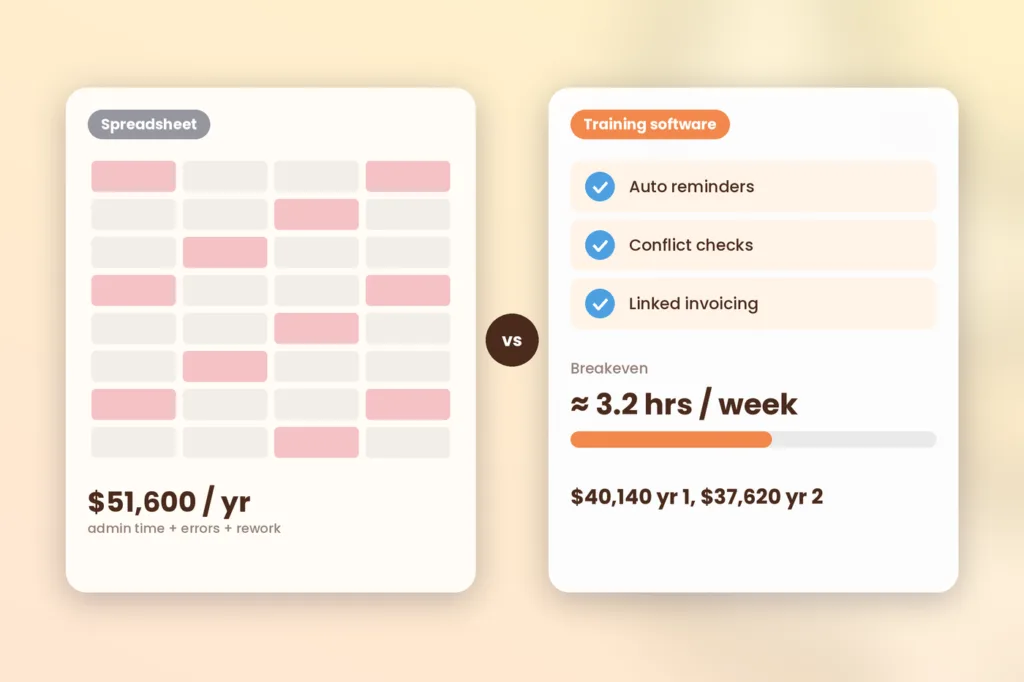
In our example, a 10-trainer company pays roughly $51,600 per year for spreadsheet administration and errors. The software alternative is $40,140 in the first year and $37,620 in the second year. Remember that these numbers are based on assumptions and serve only as an example.
Here are the assumptions:
- You have ten trainers and one full-time coordinator.
- The coordinator works for 25 hours per week on scheduling, registrations, reminders, attendance, certification, and invoicing.
- Loaded labor cost is $36 an hour.
- A mistake per month costs $400 in terms of refunds, training costs, and rebooking.
- The software helps save 35% of administrative time and reduces mistakes by 75%.
- The software license is $6,000 a year, and setup takes 70 hours once.
The $36 rate comes from public data. The median annual salary of secretaries and administrative assistants in May 2024 was $47,460 (BLS Occupational Outlook Handbook), which is about $22.80 per hour. We estimate that the training coordinator will earn $25 per hour. Benefits represented 30 percent of the cost of compensation for private employers in June 2026 (BLS Economics Daily). Thus, $25 / 0.70 = $36 per hour.
The license fee of $6,000 is just a rough number; use your own offer.
| Annual cost | Spreadsheets | Software, year 1 | Software, year 2 |
|---|---|---|---|
| Admin time (1,300 hours at $36) | $46,800 | $30,420 | $30,420 |
| Errors and rework | $4,800 | $1,200 | $1,200 |
| Software license | $0 | $6,000 | $6,000 |
| Setup (70 hours at $36) | $0 | $2,520 | $0 |
| Total | $51,600 | $40,140 | $37,620 |
| Savings vs. spreadsheets | $11,460 | $13,980 |
Now check the break-even point. A $6,000 license divided by $36 an hour equals about 167 hours a year. That is 3.2 hours a week. If you pay the first year up front, you spend $8,520 and recover it in about five months, because the software saves about $1,665 a month in labor and rework.
Test a harsher case too. If you have a software that will save you just 20% of your time and makes no mistakes, you will save 260 hours, which is equal to $9,360. After the $6,000 license, you still gain $3,360 a year, and about $840 in year one after setup.
The mathematics revolves around one variable: time savings per week. Time save your own coordinator’s week for two weeks before contacting any vendor.
How do spreadsheets and software compare line by line?
Software wins on scale, errors and reporting. Spreadsheets win on upfront cost and flexibility. Here is a side-by-side view of what matters for a 10-trainer business.
| Area | Spreadsheets | Online training management software |
|---|---|---|
| Trainer scheduling | Manual checks for conflicts | Conflict checks against availability |
| Registration | Forms, emails and copy-paste | Enrollment tied to sessions |
| Reminders | Manual or mail-merge | Automated email and text |
| Attendance and certificates | Built by hand | Tracked and issued in one place |
| Invoicing | Separate tool, re-keyed data | Linked to enrollments |
| Reporting | Hours to build | Built-in reports |
| Permissions | Everyone sees everything | Roles per user |
| Growth | More tabs, more risk | Scales with the plan |
| Upfront cost | Near zero | Subscription plus setup |
| Flexibility | Total | Limited to the product |
SimpliTrain supports many of these. You may see some of these in our training management feature page, such as instructor profiles, scheduling and performance appraisals, allocation according to availability, skills and location, automated emails and SMS messages, certification and re-certification reminder, billing and invoicing. You can read more on instructor management and training scheduling.
Just count the rows where an error means money is lost. Scheduling, invoicing, and certificates are normally the important ones.
When are spreadsheets still the right call?
Spreadsheets are still the right call when your operation is small and simple. This is just our opinion and not a mandate. The software costs money, and there is no value in it unless you use it.
Stick to spreadsheets if most of the following apply:
- You conduct just a few classes each month.
- One person handles everything and does not have to take vacations.
- You don’t accept online payments or certificates.
- There is no accreditation or audit of your records from clients.
- You seldom have problems with double bookings or reminders.
Reevaluate the situation if anything changes. Having a second coordinator, changing locations, or having a corporate client will usually do the trick. For background on what the software covers, read what training management is.
The best time to switch is before a crisis. Moving during a busy season, after a missed session, costs more than moving in a quiet month.
What should you look at before buying?
Look at the total annual cost, limitations of the plan, and workflow before you purchase. Check this list for all vendors, including us.
- Make sure about the pricing model: per student, per active student, per administrator, or fixed.
- Find out if the plan covers the management and scheduling of trainers.
- Write down all additional costs: set-up, migration, support, payment, and integration fees.
- Test trainer scheduling with a real conflict.
- Run one full flow, from registration to certificate.
- Data Import, Export & Reporting.
- Ask to be shown sample reports on attendance, trainer’s workload and revenue per course.
- Ensure that it is possible to export the data whenever necessary.
- Study roles and access rights for trainers, administrators and clients.
- Find out who does the data import and how much time it takes.
Plan limits matter. On our pricing page, for example, Starter covers courses, certifications, assessments and surveys, while trainer management and class scheduling start at Pro. Our page also says a free trial needs no credit card. Apply a test using your data, and not the demo script.
Have each supplier provide you with a total cost written figure of what they can supply to you and also twice your volume.
How do you switch without a mess?
Stages for switch and operation of two systems together. Rushed cut-over is the cause of failure of migration efforts. Steps to follow:
- Clean your sheets. Remove duplicates and fix trainer, course and learner names.
- Import the basics. Load trainers, courses and upcoming sessions first.
- Pilot one course. Take real registrations through the new system.
- Run both for two to four weeks. Compare outcomes and address any shortcomings.
- Cut over. Retire the sheets for live data, and keep them for exports only.
Meanwhile, name one owner. A migration without an owner stalls at step three.
The pilot is the cheapest insurance you can buy. One course reveals most of the surprises.
How do you test out your own numbers?
Use a calculator but with your own numbers, not ours. Our numbers are rounded up, so your answers should be different. What do you need?
- Your weekly admin hours.
- Your loaded hourly cost.
- Your monthly error and rework cost.
- The license quote you receive.
- Your one-time setup hours.
Then run the numbers in the SimpliTrain cost and ROI calculator. Try a conservative scenario and an optimistic scenario. If the conservative scenario breaks even, then the decision is a no-brainer.
A conservative scenario you can justify is better than an optimistic scenario you can’t. Finance teams trust the first one.
Your next step
Track your coordinator’s admin hours for two weeks. Now input them into the SimpliTrain cost and ROI calculator using a conservative savings estimate. If the figures add up, take a look at the platform using your own figures: discover the training management capabilities of SimpliTrain, visit the pricing page, or schedule a demo and bring your trainer list.
FAQs
1. Is training management software worth the cost for a small training provider?
It can be if it saves you more administrative time than it costs. In general terms based on our sample calculation, software that saves roughly three hours a week will justify the annual $6,000 license cost at an $36 loaded cost per hour. You can calculate your numbers to find out, since rates and volumes differ.
2. How much does the online training management software cost?
The price depends on the pricing models offered, features, and number of administrators in the team. Some vendors bill per user, some per active user and some per administrator. Ask for the annual total cost, including set up, support and integration costs at your current and projected volumes. Then compare it against what you spend on labor and rework now.
3. What is the difference between a TMS and an LMS?
Training Management System handles logistics of the training process: scheduling, trainers, rooms, registration and invoicing. Learning Management System manages delivery and tracking of the learning, i.e., courses and quizzes. Instructor-led training providers generally need the logistics functionality first and most systems include both.
4. How do I know when it is time to transition my training business to use software?
Transition when errors or administrative time begin to cost more than the license. Symptoms include double booking of trainers, manual reminders, delayed invoices, hand-built certificates, and one person understanding the spreadsheet. Our experience is that it comes around 10 trainers, but it depends on your sessions rather than staff count.
5. Will I be able to use the spreadsheet along with the software?
For a while. Try running both together for 2-4 weeks to see how accurate the system is. Then stop using spreadsheets with the live data or you’ll end up with two sets that don’t agree. Continue using the spreadsheets for custom analysis or exporting only.
6. What are some costs to watch out for while purchasing the software?
There can be setup fees, migration fees, different support level pricing, additional administrators or trainers charges, payment processing fees and paid integrations. Don’t forget to ask about pricing when the number of learners increases. Ask vendors to give you a total cost at your volume in writing.