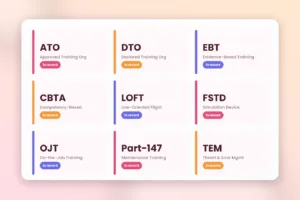
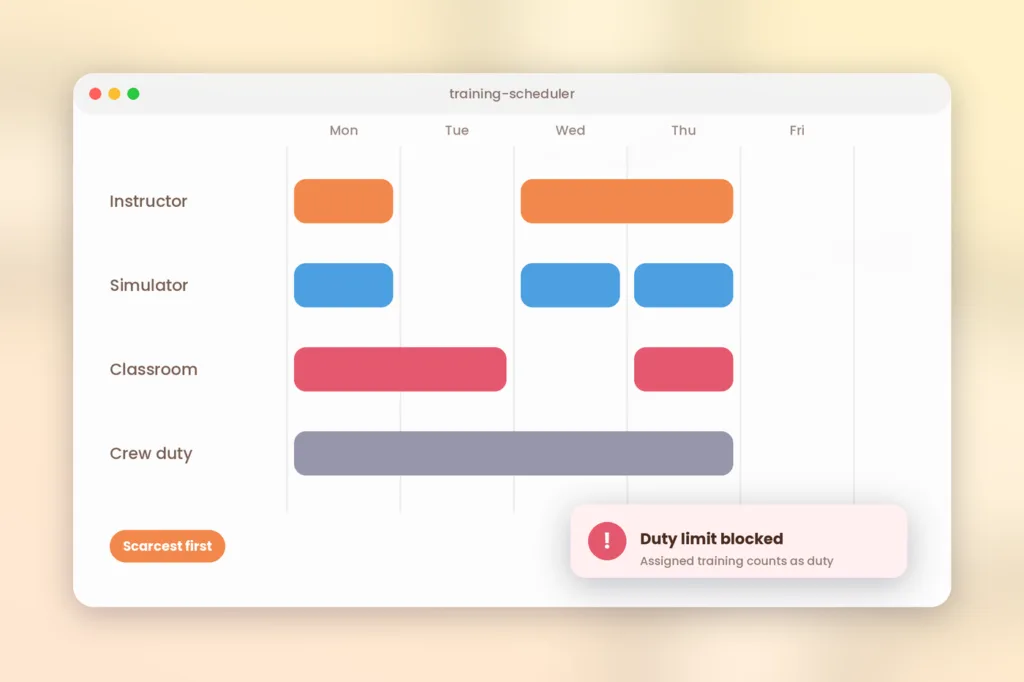





Aviation training planning will work if you plan according to the scarcest resource first, verify that all requirements are satisfied before planning, and make sure there is a back-up for every planned slot. In most cases, the scarcest resource will be the instructor, followed by the simulator, and lastly, the classroom. This is a five-tier process that will assist you in doing so.
Why is aviation training scheduling so hard?
The scheduling process of training flights is complex as all bookings should conform to a series of chained constraints at once. The flight crewman who requires recurrent training needs to find himself an instructor, space in the simulator, space in the classroom, and a duty day.
It is always the instructors that go down first. In the APATS 2026 Heads of Training Meeting, participants were asked what is the biggest threat in their training chain. The answer was always the same: it was not simulators, it was not candidates, it was not budget, but instructors. Simulation time still counts. Industry discourse cites simulator time cost as well as instructor shortfalls as some of the top constraints in airline training departments.
We propose the five-level hierarchy that will help you keep the problem manageable:
- Demand: who’s entitled, and when.
- Policy: duty, rest, prerequisites, and approval.
- Instructors: who is qualified, current, and available.
- Equipment: what simulator or training equipment is suitable and available.
- Room: which classroom or briefing room is suitable for the group.
All the plans fail since people begin from room or from simulation. Begin with demand and policy, then approach the most rare resource.
Which rules must every booking respect?
Every booking must respect duty and rest limits, because assigned training counts as duty. EASA’s FAQ says training an operator assigns counts as duty, whatever the method. E-learning could either be a single period as duty or as blocks of time allocated for it. In whichever case, it will have to comply with the duty and rest requirements and it must be described by the operator in his/her operations manual.
The FAA takes a similar view. In a legal interpretation for a Part 135 operator, the agency said assigned training counts as duty, including distance learning, and cannot fall in a required rest period (FAA letter of interpretation).
Here is what counts as duty under the EASA FAQs and the FAA letter.
| Activity | Counts as duty? | Source |
|---|---|---|
| Conversion, line or simulator training the operator assigns, including training briefings | Yes | EASA FAQs |
| E-learning the operator assigns | Yes, as a duty period or allocated hours | EASA FAQ |
| Travel to a simulator at the operator’s request | Yes, as a duty period | EASA FAQ |
| Self-preparation for checks | No, and not recorded | EASA FAQ |
| Assigned distance learning (US Part 135) | Yes | FAA letter |
Records follow the same logic. EASA says records of duties are kept for 24 months and records of crew training, checking and qualifications for 3 years. The page on ORO.FTL FAQs holds the related answers.
Before you confirm any booking, run this rule check:
- Does the duty and rest plan still work for this person?
- Is the instructor current and authorized for this event?
- Does the device suit the task?
- Are the prerequisites done, such as ground training before simulator sessions?
- Will the record flow into the crew roster and the training file?
A schedule that ignores duty time is not a training schedule. It is a future finding. Link training bookings to rostering before the first session.
How do you schedule instructors?
Schedule instructors by authorization, currency and fatigue limits, not just by availability. A free instructor who is out of currency is not available.
Instructors have their individual requirements. In the United States, for example, Subpart N of Part 121 deals with different qualification and training requirements for check airman and flight instructor, which apply to initial, transition, and recurrent training and checking . According to the rule summary of FAA, the other two requirements are recency of experience and line observation. So an instructor’s calendar must carry their own due dates too.
Give every instructor profile these fields:
- Authorizations by type and role.
- Currency and check due dates.
- Base and travel limits.
- Availability windows.
- A fatigue cap, such as maximum sessions per day or nights in a row.
- Standardization days attended.
Halldale’s report shows what a fatigue cap can look like. One provider limits simulator instructors to no double sessions and no more than three nights in a row, in a country with no fatigue rules for simulator work, because quality drops sharply without it. It also pays instructors to attend standardization days. Consider it as an example, and nothing else.
Calculate instructor capacity in advance. Calculate how many sessions each instructor can do in a month, minus standardization and cover, and then you can promise simulator dates.
How do you schedule simulators and other devices?
Schedule devices by task fit, availability and maintenance windows. The slot is only viable if the device fits the training exercise and the trainer is available at the same time.
Actual airline schedulers balance multiple device policies simultaneously. One vendor case study for Alaska Airlines includes maintaining the trainee on the same simulator and time slot, handling different simulator devices for different segments of the course, reserving time for maintenance and recurrent training in remaining simulator slots. That list shows how many rules sit behind one slot.
Use this device checklist:
- Record each device’s type, qualification level and tasks it may cover.
- Block maintenance and evaluation windows in advance.
- Try to use the same device for a trainee throughout your course, where possible.
- Schedule the instructor along with the device, never separately.
- Keep some openings open for retakes and late cancellations.
- Create a policy to release the slots after some specific period, say 72 hours prior to the session. This is our suggestion, so choose a window that fits your operation.
A simulator is an expensive piece of equipment. Value the idle time by considering it a cost, and use the last-minute cancellation to revise your release policy.
How do you schedule classrooms and ground training?
Plan the rooms according to the sequence of the course, number of the group and mode of delivery. Ground training precedes simulator training; hence schedule the former first.
Do this:
- Order the course so that a simulator training cannot be scheduled before the ground training.
- Room capacity should be proportional to cohort size and room for repeat.
- Mix formats. A virtual classroom can free a physical room.
- Record time zones for multi-base teams.
- Allow for offline delivery where crew train away from a network.
According to the SimpliTrain aviation web page, the Training Scheduling module deals with simulator scheduling, instructors, classroom capacity scheduling in addition to the scheduling of training for crews. According to it, the scheduler schedules recurring training sessions at various bases and fleets without clashes, and synchronization takes place once the crew completes their training, whether online or offline (SimpliTrain aviation training management).
Rooms are never the biggest time wasters, but they are the biggest avoidable ones. An empty room with an absent instructor means a failed booking.
What is an ideal scheduling routine on a weekly basis?
The short, set weekly schedule eliminates almost all last-minute problems. Here is a sample that we can recommend.
- Monday: list all those due during your planning period, beginning from the closest expiry date.
- Tuesday: pair instructors with gadgets and review the rules of each booking.
- Wednesday: confirm it with the rostering department to make sure training is within limits and rest time.
- Thursday: confirm backup for two weeks ahead.
- Friday: review no-shows and cancellations and reason for it.
SimpliTrain’s aviation page describes automated alerts at 90, 60 and 30 days before certifications expire, which gives you three planning checkpoints. See our pages on certification management and instructor management for more.
Friday review gives its returns the quickest. From the patterns of cancellations, you know the rule that causes the most trouble.
What features should be in your scheduling software?
Make sure to get software that verifies rules before confirming the booking and not afterwards. The following three software types are available today: flight school booking software, airline training resource software, and instructor training platform software. Each serves its unique purpose.
Go through this checklist with each software vendor:
- Does it check instructor authorization and currency before it books?
- Does it hold device calendars with maintenance blocks?
- Can it link training bookings to crew rosters and duty records?
- Can it enforce course order and prerequisites?
- Does it flag conflicts, and does it also suggest fixes?
- Does it handle multiple bases and time zones?
- Does it report utilization, cancellations and instructor load?
- Can you export data for audits?
Be careful with “optimization.” Some tools only flag conflicts. Others build schedules automatically. Which one do you choose? Instructors using the SimpliTrain instructor portal have access to only those courses that have been assigned to them, and their schedule shows the date, time, and mode of delivery. For calendar integration details, confirm the setup in a demo. Also read our aviation training management software guide for the wider system view.
If you run complex simulator rosters for a large fleet, test whether any tool, including ours, handles your own rules. Ask each vendor to schedule your hardest week.
Your hardest week has the sick instructor, the simulator in maintenance and the pilot near expiry, all at once.
Your next step
Choose one repeated course. Write down the five levels of that course: who it is for, what standards it follows, who can teach it, what equipment it needs, and which room it can be taught in. See how many answers you get in just one place. Find out how SimpliTrain deals with scheduling by checking out our training management and aviation training management capabilities, or book a demo and bring your hardest week.
FAQs
1. What is aviation training scheduling?
Aviation training scheduling is the process of matching crew or staff due for training with qualified instructors, suitable devices and rooms, within duty and rest rules. It includes initial, recurrent, and conversion training. Efficient planning will also provide inputs to rosters and training records, thereby updating all relevant systems from one schedule.
2. Is Simulator Training counted as Duty Time?
Under EASA’s FAQs, training an operator assigns counts as duty, including simulator sessions and e-learning, and travel to a simulator at the operator’s request counts as a duty period. Self-preparation for checks does not count. The rules differ by authorities, so check yours before you develop your rostering rules.
3. What restricts the number of sessions an instructor can give?
There is no general figure. Restrictions depend on the regulator, operator policy, and fatigue risk. According to Halldale, there was one provider who prohibited double sessions and limited simulator instructors to three nights in a row. Set your limit, put it in your manual and use in the scheduler.
4. How much in advance should you schedule recurrent training?
Plan well in advance and allocate extra slots as well. The common approach is to plan 90 days in advance, confirm 60 days in advance, and lock 30 days in advance. This is just a suggestion and not a mandate. Choose lead time according to your simulator and qualification cost.
5. What do you do when the last minute cancellations happen in the simulators?
Maintain the backup list of instructors as well as the crew to cover all slots. Remove all blank spaces according to the existing policy. Reschedule in the same cycle along with mentioning the reasons. Try to figure out the reason behind the pattern of cancelations and solve the problem.
6. Is the generic training management system suitable for managing the aviation schedule?
Yes, it can, but verify the requirements related to the aviation industry like instructor certification, device authorization, duty linkages, etc. Then run your hardest week through the demo. A general platform may suit ATOs, MROs and ground training better than complex airline rosters.