




Flight training management software can ensure your students on a syllabus, booking of aircraft and simulators, instructor currency and audit ready grading are all managed together. Many flight schools and airlines will fall into the trap of buying a sleek calendar system during a demo. When purchasing in 2026 ensure you get a system with 6 key features. These include prerequisites, blocking dispatch, offline grading on an iPad and a flat admin cost.
Why isn’t a sleek calendar audit ready?
A drag and drop calendar won’t protect your operating certificate during an unannounced audit by FAA or EASA. Many software providers will provide a sleek demo; however, they will focus on colour coded aircraft scheduling and not have any compliance logic. Once you’re using it in real life, you’ll quickly notice that it doesn’t have the features needed to track online theory exams and allow you to know when to dispatch students, plus it won’t know how to calculate grace periods for the base month.
If your scheduler isn’t integrated with an LMS, you’ll have to manually check out course completion between multiple spreadsheets. According to an industry review in May 2026, most standalone flight schedulers simply don’t have native LMS courses. This means you’ll have to manually enter exam scores into the system, increasing the risk of dispatching an unqualified student.
Real flight training management software will integrate your online ground school, resource scheduling and pilot training records into one place. If a trainee’s medical certificate has expired, or they’ve failed a stage check, they won’t be able to be dispatched. When purchasing software you should look beyond the nice calendar visuals and test the system to see how it handles these processes in real life.
6 things to look for when buying flight training management software
When considering flight training management software ensure that your system can integrate online learning, dispatching, marking and compliance. Using these 6 points will help you identify simple flight club systems from advanced aviation solutions during vendor demonstrations.
1. Native LMS with Pre requisite Ground School
Your software should have a built in SCORM compliant LMS. When a student completes an online aerodynamics module it should automatically unlock the next flight or simulator lesson. If the student hasn’t completed the required theory exam they should be prevented from booking the aircraft by the scheduler.
2. Quadruple checks and hard scheduling blocks
A compliant system will require a scheduler to check 4 variables in real time to ensure the flight or simulator can be scheduled. These variables are student syllabus requirements, instructor rating and medical validity, aircraft maintenance status and crew duty limits. Ask your vendor to show how they will apply a hard scheduling block if a medical has expired.
3. Offline iPad marking and remediation
Instructors often mark lessons at remote ramps or inside concrete simulators where there may be no reliable Wi Fi. The system will need to allow examiners to mark syllabus elements and CBTA observable elements using an iPad whilst offline. A compliant system will have dual electronic signatures in line with 2026 FAA Advisory Circular 120 78B and will automatically schedule remedial training.
4. Auto FAA base month and EASA currency calculations
Simple scheduling tools can only add 365 days to the completion date. The engine will need to be able to automatically calculate FAA early and late grace months plus 90 day re validation periods (EASA) and automatically send 90 60 30 day notifications to pilots and training coordinators.
5. 60 second authority audit export and data ownership
During an audit by inspectors, it is expected to have instant access to chronological file histories for students and crew. Under new rules from 2026 (14 CFR § 141.101 (eCFR) and EASA Part ORA (ORA.GEN.220)), schools will need to retain secure training records for 3 years. Ensure that your platform can export Electronic Training Records ready for audit in under 60 seconds and that you have full data ownership rights should you change vendors.
6. Role based access and B2B client portal
Training is often provided by Commercial Approved Training Organisations (ATOs) and contract training centres to sponsor cohorts on behalf of external airlines. Your software should allow for secure multi tenanted B2B portals so that airline clients can view attendance, stage checks and invoicing for their cadets. Role based access will ensure that external sponsors have no access to your internal systems, only their own cohorts.
How do leading flight training management platforms compare in 2026?
Flight training platforms will vary based on whether there is an integrated LMS, what aviation sectors they are designed for, and if there are any growing fees. See the table below to see a comparison of 5 popular shortlisted platforms in 2026.
| Platform | Built In LMS | Primary Aviation Focus | Offline Grading & CBTA | Typical Pricing Model |
|---|---|---|---|---|
| SimpliTrain | Yes (Unified LMS + TMS + LXP) | Airlines, Commercial ATOs, & MROs | Full offline iPad & CBTA rubrics | Flat per admin ($60/mo/admin) |
| FlightLogger | No (Classroom & exam logs only) | Ab initio ATOs & cadet academies | Offline tablet syllabus grading | Base fee + per active user |
| Aviatize | No (Requires external LMS integration) | Aeroclubs, DTOs, & light flight schools | Digital training & SMS forms | Per aircraft ($29 $89/aircraft/mo) |
| Flight Schedule Pro | No (Basic training progress hub) | Part 61 & Part 141 flight schools | Mobile instructor signoffs | Tiered per aircraft / user fees |
| MINT TMS | Yes (Enterprise learning modules) | Large Part 121 commercial carriers | Full EBT/CBTA grading suite | Custom enterprise quote |
Live Vendor Demo Scorecard: what to test before signing a contract
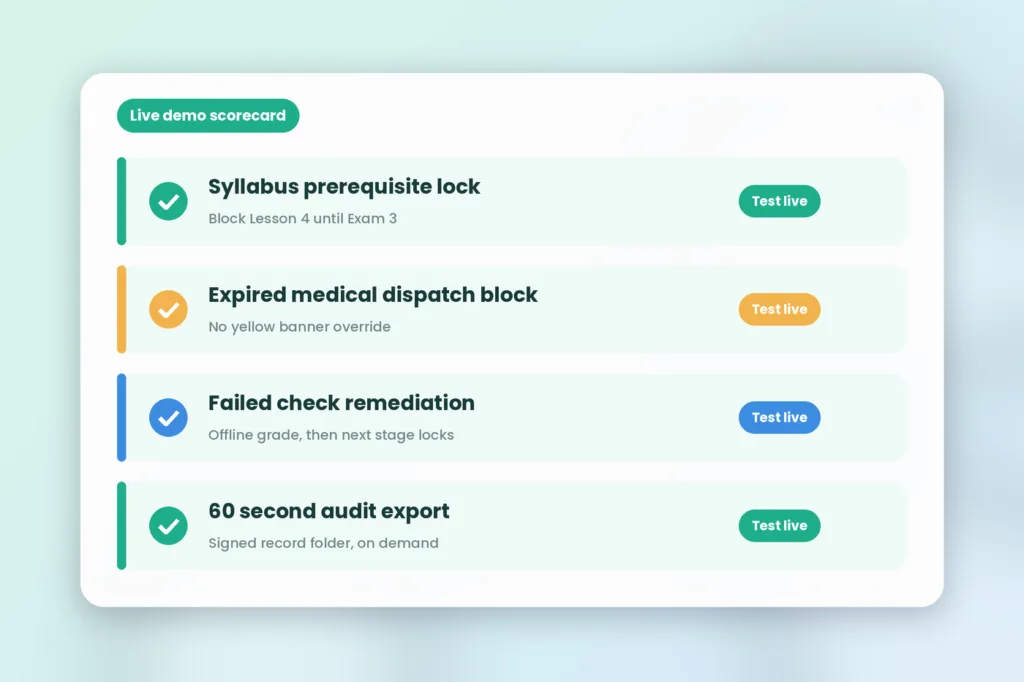
Don’t waste time having your salespeople walk you through dragging blocks on a calendar. Give the vendor engineer this 4 point scorecard and ask them to demonstrate each of these workflows live in the software.
| Workflow to Test | Exact Prompt for the Vendor Demo | Red Flag to Watch Out For |
|---|---|---|
| Syllabus Prerequisite Lock | “Show me how the system blocks a student from booking Flight Lesson 4 if Ground Exam 3 is incomplete.” | The rep admits that ground school lives in a separate LMS and requires manual CSV uploads. |
| Expired Medical Dispatch Block | “Try to dispatch an instructor or student whose medical certificate expired yesterday.” | The software shows a yellow warning banner but still lets the dispatcher confirm the flight. |
| Failed Checkride Remediation | “Record a failing grade of 1 on a stage check offline, reconnect to Wi Fi, and show what happens next.” | The system records the failure but does not lock the next stage or trigger remedial lessons. |
| 60 Second Authority Audit Export | “Export a complete, signed FAA Part 141 or EASA Part ORA student record folder right now.” | Generating the file requires custom SQL reporting or stitching multiple PDF exports together. |
How to check how much it will really cost you over 3 years (per trainee, per aircraft, per admin)
The 3 year total cost of ownership can be greatly affected by the type of licensing your software uses. In 2026, there are 3 different pricing models you will likely come across.
A per trainee model will charge you a monthly fee for every student, pilot, or technician you have in your database. Often flight students will take a break from their training due to weather or seasonal leave, meaning schools are paying thousands of inactive profiles. The same applies to high turnover of charter airlines and contract training centers.
Per aircraft pricing can be around $29 to $89 per tail number per month, often with an onboarding cost of $1,000 to $5,000. Per aircraft pricing is not ideal if you have simulator only training, cabin crew training or Part 145 MRO training, as you are unable to allocate your technician or cabin crew compliance costs to aircraft numbers.
SimpliTrain removes any penalties for users or fleet with a simple flat rate per admin pricing starting from $60 per month per administrator. You are charged only for the people in your back office who are coordinating and managing your training. There are unlimited students, pilots, instructors, and B2B clients. View full licensing options in us Training Management Software Buyers Guide 2026.
FAQs
1. What is flight training management software?
Flight training management software is a single database solution that includes managing your syllabus, simulator and aircraft booking, instructor currency and digital marking. A full solution will ensure all FAA and EASA requirements are automatically met. Trainees will not be able to book any lessons until they have valid ground exams and medicals.
2. What should you look for in a flight training software demo?
Look for real life scenarios being demonstrated. Ask to see an example of a blocked dispatch due to an expired medical, iPad not syncing due to no internet and failed remedial process for stage checks. Ensure the platform can export audit files from the authorities in under 60 seconds.
3. Do all flight training management systems include a built in LMS?
No. Most flight scheduling tools are simply aircraft and Hobbs scheduling tools. This means that schools have to purchase a separate e learning portal. SimpliTrain is an all in one solution with both an online LMS and TMS. Once students pass their ground exam (SCORM format), they can automatically book simulator or flight time.
4. How does the cost per aircraft compare to a flat per admin rate?
With cost per aircraft, you pay a monthly fee for each aircraft on your flight line. This is ideal for small aeroclubs. If you are training large groups of simulator users, cabin crew, dispatchers or MRO technicians that do not use aircraft, then a flat admin rate ($60/month with SimpliTrain) will be much cheaper.
5. Can flight training software export audit ready FAA and EASA records?
Yes! Your flight training software should be able to produce a full Electronic Training Record within 60 seconds in a format that can be audited by both FAA Part 141 and/or EASA Part ORA. Before signing any contracts make sure you have full ownership of your data and can export all previous student grades and certificates effortlessly.
6. Does flight training management software support offline iPad grading?
Yes! Modern flight training management software lets you download your students’ syllabus cards and CBTA matrices to your iPad. You can then fully grade your students’ maneuvers, behaviors and collect two electronic signatures all whilst offline. Once you get back on Wi Fi, your records will automatically sync.
Try our flight training workflows in a live SimpliTrain demo
See how your current training system is letting you down. Are you using multiple systems like calendars, e learning, and Excel to track compliance? How many hours are your coordinators spending manually ensuring users meet pre flight requirements? How much are you paying for your current vendor for inactive student profiles?
Simplify your training with our all in one solution. Our Aviation Training Management System gives you online ground school, no conflict scheduling, offline grading and expiry tracking. See how ATOs, airlines and MROs keep their training audit ready with our SimpliTrain and book a SimpliTrain Demo.