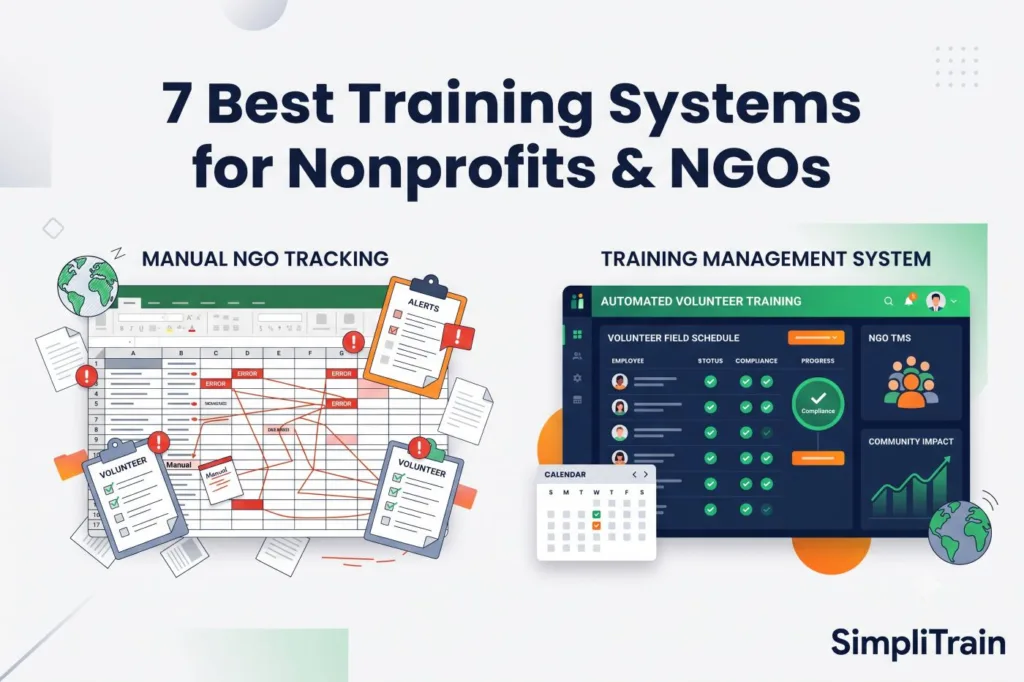






The right training software for a nonprofit organization or NGO should be chosen in a way that considers both the high turnover of volunteers and the limited grant budget. The software to train personnel in non-academic settings may have to address logistical issues unique to the NGO environment. What is the best training software for an NGO? It depends on whether you need to provide online compliance instruction exclusively or also deliver onsite instructor led training.
What is the best training management system for an NGO?
For NGOs that run their volunteer or field training SimpliTrain, A Training Management System with a built-in LMS, is the best training management system since its cost does not grow with learner numbers and training management system manages trainers, venues and attendance. For training a learning management system like TalentLMS is sufficient.
How we evaluated training software?
To come up with this shortlist we evaluated 24 training platforms against the needs of the nonprofit sector. Corporate software assumes staff figures and fast office internet. NGOs on the hand have high volunteer turnover, seasonal deployment spikes, field teams with low bandwidth learners speaking many languages and strict donor reporting rules.
We also cut platforms that do not provide compliance reports or require minimum annual contracts over $30,000 and do not offer charity tiers.
For the seven tools we used these criteria:
- Pricing transparency: We reviewed each vendor’s pricing page in September 2026 to confirm starting costs, nonprofit discounts and free plans.
- Support: The platform needs to handle scheduling of people and physical resources not only digital files.
- Compliance tracking: The training management system needs to create auditready reports, for grant issuers.
- NGO suitability: We pinpointed real nonprofit scenarios where each tool succeeds or fails based on actual feature limits.
TMS vs LMS: Which does your NGO need?
Understanding the difference between a Talent Management System TMS and a Learning Management System LMS prevents expensive procurement mistakes. An LMS delivers and tracks online courses. A Talent Management System TMS runs the operations behind all training (scheduling, trainers, venues, resources, registrations, costs, and reporting), both live and online.
| Training delivery type | Best software category | Primary function |
|---|---|---|
| Online-only (Asynchronous) | LMS (Learning Management System) | Hosts SCORM files, videos, and quizzes for self-paced learning. |
| In-person only (Classroom/Field) | TMS (Talent Management System) | Manages venue booking, trainer schedules, and equipment allocation. |
| Blended learning (Hybrid) | TMS + LMS portal | Tracks physical attendance while hosting pre-reading digital materials. |
| Webinar-only (Synchronous) | LMS with Zoom integration | Tracks digital attendance for live, remote sessions. |
Feature comparison: Top training platforms for nonprofits
| Platform | Best for | Pricing basis | Starting price | Free plan/trial | Nonprofit discount | ILT/venue scheduling | Mobile/offline |
|---|---|---|---|---|---|---|---|
| SimpliTrain | Operational logistics | Flat-rate workspaces | Custom quote | Free trial (no card) | Yes (501c3) | Yes | Yes |
| Arlo | Commercial training providers | Per-admin + per-registration | $118/mo | 14-day trial | 25% | Yes | No |
| TalentLMS | Pure e-learning | Active-user | $119/mo | Free plan (5 users) | 20% | No | Yes |
| Accessplanit | Complex, high-volume organizations | Custom quote | Custom quote | Custom demo | Varies | Yes | No |
| LearnUpon | Blended corporate learning | Active-user | ~$15,000/yr | Custom demo | Varies | Basic | Yes |
| Cornerstone | Massive global NGOs | Enterprise custom | >$50,000/yr | Custom demo | Varies | Yes | Yes |
| Docebo | External partner training | Active-user | ~$35,900/yr | Custom demo | Varies | Basic | Yes |
SimpliTrain: Best for operational logistics
SimpliTrain manages the back-office operations for training (ILT). Focusing only on digital course delivery SimpliTrain, A Training Management System with a built-in LMS, automates the scheduling of human trainers, regional physical venues, and physical equipment.
Best for: Best for NGOs that manage changing groups of on-the-ground volunteers. Not for organizations that want a digital e-learning authoring tool.
Key SimpliTrain features for nonprofits:
Schedule forty trainers across twelve district centers without double-booking field equipment.
Enable volunteer self-registration and waitlists to automate roster management for high-demand community workshops.
Export attendance registers and completion certificates in the CSV or PDF format your funder asks for.
Trigger automated certificate expiry reminders to ensure compliance gaps do not disrupt fieldwork.
Provide a trainer portal and mobile access for field teams operating in low-bandwidth zones.
Model: Flatrate based on workspaces (one, five, fifteen or unlimited workspaces).
Starting price: Custom flatrate quote based on required workspaces.
Free plan/trial: trial available with no credit card required.
Pros:
- Your bill does not rise with learner numbers: training fifty or five thousand volunteers costs the same on your plan.
- Centralizes venue and trainer schedules in one calendar.
- Syncs data natively via API with donor or volunteer Customer Relationship Management (CRM) tools such as Salesforce Nonprofit Cloud and Bloomerang.
Cons:
- Lacks a SCORM course builder; requires external authoring tools to create interactive digital files.
- Interface focuses on administrative data lacking gamified student experiences.
- No foreverfree tier for microcharities.
“Nonprofits are uniquely punished by software pricing. When a disaster relief NGO needs to mobilize 500 temporary volunteers to staff a weekend crisis response they should not get hit with a surprise activeuser overage fee on their Talent Management System TMS. That is why flatrate pricing is a necessity, not just a musthave.” Head of Product SimpliTrain
Arlo: Best for training providers
Arlo is a training management system built for providers who sell courses to the public. If an NGO funds its operations by charging for certifications, professional workshops or industry credentials Arlo handles the ecommerce and website integration natively.
Best for: Best for NGOs that generate revenue through paid courses. Not for volunteer onboarding or disasterrelief deployments because of its perregistration fees.
Key features tied to NGO tasks:
- Native website integration publishes course schedules to a publicfacing domain.
- Ecommerce checkout handles varied tax requirements, discounts and group bookings.
- Automated waitlists fill empty seats when attendees cancel paid registrations.
Pricing:
Model: Peradmin license plus a perregistration fee.
Starting price: $118 per month per admin for the tier $204 per month for the Professional tier $271 per month for the Enterprise tier. Arlo also charges $2.15 per paid registration and $1.07 per registration.
Discounts: 25 percent discount for charities.
Pros:
- Integration with Stripe and PayPal for course sales.
- Automated email marketing campaigns for upcoming public courses.
- Handles complex multisession and recurring scheduling.
Cons:
- Every free volunteer orientation still costs the NGO $1.07 per registration.
- Peradmin pricing scales poorly if an NGO relies on regional coordinators.
- Lacks native fieldequipment allocation tools.
TalentLMS: Best for e-learning
TalentLMS is an LMS, not a TMS. However we included it in this list for NGOs that conduct training. If your organization just needs volunteers to complete an onboarding quiz or watch a dataprivacy video TalentLMS is quick to set up and very affordable.
Best for: Best for NGOs that have fully remote deskbased volunteers completing digital compliance checks. Not for organizations that run inperson instructorled field training.
Key features tied to NGO tasks:
Draganddrop course builder turns existing PDFs and videos into modules.
Customizable user portals allow NGOs to brand environments differently for donors and, for volunteers.
Mobile app supports offline syncing for learners who have internet access.
Pricing:
Model: Active-user tiers (billed each month on users that log in).
Starting price: $119/month (Core tier, up to 40 users) $229/month (Grow tier) $449/month ( tier).
Free plan: Forever free for up to 5 users and 10 courses.
Discounts: 20% discount on plans for nonprofits.
Pros:
- Setup requires no IT experience.
- Free tier is fully functional for micro-charities.
- Includes gamification features like badges and leaderboards.
Cons:
- No native. Live-trainer scheduling tools.
- Active-user pricing becomes expensive as volunteer numbers scale past 100.
- Reporting lacks the depth required for complex government grant audits.
Accessplanit: Best for high-volume organizations
Accessplanit is a UK-based training management system designed to automate manual administrative tasks.
Accessplanit is strongest in sectors and caters to large networks managing high-volume compliance training.
Best for: Best for UK/EU training networks coordinating complex compliance courses annually. Not for NGOs without dedicated administrative staff.
Key features tied to NGO tasks:
- Workflow automation engine triggers tasks, such as emailing a venue manager when a class reaches 20 registrations.
- Detailed compliance tracking manages -step, multi-year certification paths for health and safety workers.
- Custom report builder isolates demographic data for grant proposals.
Pricing:
Model: Custom quote (Admin licenses + delegates trained per year + one-time implementation fee).
Starting price: Quote-based only.
Discounts: Lists “Not for profit” as a supported sector with discounts.
Pros:
- Eliminates manual data entry through custom workflows.
- Detailed financial tracking supports cross-charging.
- Dedicated UK-based support team.
Cons:
- The implementation process typically takes 90 days.
- Requires a system administrator to maintain the complex workflows.
- Pricing is opaque. Requires direct sales contact.
LearnUpon: Best for corporate learning
LearnUpon bridges digital e-learning and live webinar delivery.
LearnUpon is an enterprise-level LMS that integrates closely with conferencing tools making it a reliable choice for NGOs operating across multiple time zones.
Best for: Best for NGOs relying on Zoom, Webex or Microsoft Teams for synchronous remote training. Not for NGOs managing physical on-the-ground field training logistics.
Key features tied to NGO tasks:
- Multi-portal architecture allows an NGO to spin up a branded training site for a specific grant project.
- Native webinar integrations track attendance automatically without imports.
- Automated user provisioning syncs with HR software.
Pricing:
Model: Active-user tier.
Starting price: Quote-based; industry listings indicate contracts start $15,000 annually.
Pros:
- Accessible user interface for learners.
- Reliable handling of -language content.
- Excellent customer support metrics.
Cons:
- Barrier to entry with expensive annual contracts.
- Active-user tiers make cost forecasting difficult during volunteer drives.
- Limited functionality for managing classroom constraints.
Cornerstone OnDemand: Best for global NGOs
Cornerstone OnDemand provides a complete Human Capital Management (HCM) suite meaning HR, payroll and training in one system.
Cornerstone OnDemand integrates training data directly with performance reviews and succession planning.
Best for: Best for organizations (e.g. UN agencies) with thousands of permanent employees. Not for nonprofits, charities or volunteer-driven organizations.
Key features tied to NGO tasks:
- Deep compliance tracking maps training completions to global regulatory requirements.
- Performance management tools link training outcomes to employee reviews.
- Supports, over 40 languages natively.
Pricing:
Model: Enterprise custom.
Starting price: Quote-based; enterprise implementations frequently exceed $50,000.
Pros:
- Consolidates all HR and learning data into a global reporting structure.
- Advanced. Ai-powered skills mapping.
- Scales to support hundreds of thousands of global users.
Cons:
- Docebo is priced out of reach for ninety-five percent of the sector.
- Docebo takes months to set up and needs help from consultants.
- Docebo’s interface is dense. Can frustrate temporary volunteers.
Docebo: Best for external partner training
Docebo is a learning platform that uses AI to organize content and help people learn together. Docebo works well for NGOs that act as central knowledge hubs for community partners or allied health workers.
Best for: Best for NGOs that share training libraries with global partners. Not for NGOs that need tools to manage physical event logistics.
Key features tied to NGO tasks:
- Docebo’s AI tags and sorts uploaded videos and PDFs so they are easy to find.
- Docebo’s “Discover, Coach & Share” module lets field workers upload their best-practice videos for the network.
- Docebo’s mobile app lets field workers sync training data even when they are offline.
Pricing:
Model: Docebo sells on an active user basis with a contract.
Starting price: Docebo’s starting price is quoted; public AWS Marketplace listings show thirty-five thousand nine hundred dollars a year.
Pros:
- Docebo has an easy-to-use interface.
- Docebo automatically translates content for users.
- Docebo encourages sharing knowledge between partners.
Cons:
- Docebo requires a minimum contract value.
- Docebo focuses on digital learning and does not provide tools, for managing in-person events.
- Administrators say the back-office setup is hard to learn.
Why does per-learner pricing hurt NGOs?
Traditional per-seat or active-user pricing creates financial problems for NGOs because the number of learners changes a lot depending on grant cycles and emergencies. Unlike companies that have numbers of employees, nonprofits use seasonal and temporary volunteers.
Industry data shows that on average nonprofit volunteers leave at a rate of 40% each year. If a group that helps with disaster relief needs to bring in 300 temporary volunteers for flood help per-learner models make this harder. NGOs face costs when they have more volunteers for a short time.
Worked cost comparison: User vs flat-rate
Note: This model compares TalentLMS’s active-user pricing structure (averages about $4 per user at
| Learner headcount | Estimated active-user cost ($4/user) | SimpliTrain flat-rate cost | Budget impact |
|---|---|---|---|
| 50 Volunteers (Off-season) | $200 / month | $1,500 / month | Flat-rate is higher during quiet periods. |
| 500 Volunteers (Standard operations) | $2,000 / month | $1,500 / month | Flat-rate breaks even and becomes cheaper. |
| 2,000 Volunteers (Grant deployment) | $8,000 / month | $1,500 / month | Active-user pricing drains $6,500 extra per month. |
| 5,000 Volunteers (Crisis response) | $20,000 / month | $1,500 / month | Active-user pricing burns through grant budgets. |
Choosing a flat-rate platform like SimpliTrain treats training software as a predictable core utility, shielding the NGO from punitive fees when volunteer recruitment succeeds.
Best pick by NGO scenario
Software needs change based on the mission. Here is how these platforms match life nonprofit situations:
- Small NGO with less than 50 volunteers: TalentLMS. The free plan covers up to 5 users and 10 courses and the $119 per month plan works for groups that need basic digital compliance checks.
- Disaster response growth: SimpliTrain. When an emergency needs to bring in 1,000 volunteers in a week SimpliTrain’s flat-rate pricing stops extra costs and its scheduling tools help manage physical relief supplies.
- Multi-country digital programs: LearnUpon. The multi-portal feature lets an NGO make training areas that are localized and translated for countries all from one main dashboard.
- Health-worker certification (Paid): Arlo. If the NGO makes money by selling safety certifications to the public Arlo’s e-commerce features handle the sales directly.
Paying for it: Grants and nonprofit discounts
Never pay price for training software. The nonprofit sector has three advantages when buying software:
- Direct 501(c)(3) discounts: Many companies give hidden discounts from 15% to 30% for registered charities. Always ask the sales person before signing a contract.
- TechSoup partnerships: Check software lists like TechSoup that often get discounts or donated licenses for small NGOs.
- Grant budget lines: When writing a grant request for capacity building include a line for the TMS under “operational infrastructure.” Funders like to support systems that can grow of paying for ongoing manual work.
Case study: The scheduling problem
A regional community action agency used spreadsheets to manage 300 volunteer tutors in 14 libraries. Every term the program manager spent three weeks checking volunteer time library hours and background check expiration dates.
By using a TMS the agency automated the scheduling. Volunteers signed up themselves for time slots and the system blocked anyone with an expired background check. This change saved 120 hours of work each year letting the program manager focus on improving the curriculum of entering data.
What to look for in training software
When looking at a TMS or LMS nonprofits need to focus on real-life needs not just marketing features:
- Volunteer self-registration: Administrators should not have to add names manually. The system should let volunteers make profiles upload their documents and sign up for open events.
- Waitlist automation: Volunteer no-shows are common for training. The system should send an email to the person on the waitlist when a spot opens up.
- Funder- reports: Can the software make a quick PDF report that shows all active volunteers in a certain area finished their training in 2026?
- Mobile and offline access: Many field workers work in areas with internet. The platform should let users download materials finish them offline and send the data back when they get a connection.
- Support: Global NGOs need interfaces that switch between regional languages based on the user’s browser.
- CRM sync: The software must connect via API, CSV or Zapier with your donor or volunteer CRM (like Salesforce Nonprofit Cloud or Bloomerang) to keep all records in one place.
Frequently asked questions
1. What’s the difference between an LMS and a TMS for an NGO?
An LMS. Tracks online courses. A TMS handles all the work behind training like scheduling, trainers, places, resources, sign-ups, costs and reports both online and in person.
2. Can a TMS help with reporting for grant compliance?
Yes. A TMS keeps track of who attended certificates, when things expire and audit trails. Admins can quickly get reports in the format to show the NGO met training rules.
3. Does SimpliTrain connect with Salesforce Nonprofit Cloud or Bloomerang?
Yes. SimpliTrain, A Training Management System with a built-in LMS, links with your donor or volunteer CRM using built-in connections, API or CSV. It works with systems like Salesforce Nonprofit Cloud, Bloomerang and HubSpot to keep volunteer data updated.
4. Is there free training software for nonprofits?
Yes. Some only platforms have free plans for very small charities, like TalentLMS, which has a forever-free plan for up to 5 users and 10 courses. NGOs that do live instructor-led training will need to pay for software.
5. Which training platforms offer discounts?
Yes. Most large training platforms give discounts from 15% to 30% for registered 501(c)(3) charities. Companies like SimpliTrain, Arlo and TalentLMS offer charity pricing when asked.
6. How much does a TMS cost for a NGO?
The price changes a lot depending on the model. Small NGOs usually pay about $1,500 to $3,000 a year. Flat-rate models have costs while per-user models are cheaper at first but get expensive when they need more volunteers.
7. Can grant money pay for training software?
Yes. Training software is part of building capacity and many funders support it if it is clearly listed in the proposal. Adding a TMS shows the group wants to grow and follow rules.
8. Does training software work offline for field teams?
Yes. Leading training apps are made for areas with internet. Teams can download materials finish them offline and send the info back when they get a connection.
Next steps for scaling your logistics
Getting training software means finding the tool, for the mission. If the NGO handles people in the real world a regular LMS won’t work. SimpliTrain, A Training Management System with a built-in LMS, gives the back-office tools and flat-rate pricing needed to grow the volunteer base without using much grant money.